How The Vault Handles Controllers
This is the guide to the machinery underneath the "one pad drives everything" promise — how The Vault reads controllers, how it keeps a live picture of what's connected, and how it decides the right way to feed each pad into each emulator. It's the reference we keep current as controller support grows.
1. The core question: who owns the input?
Before anything else, The Vault classifies each emulator + controller pairing by who actually delivers the button presses to the game. That single decision determines whether reacting to a controller being turned on mid-game is our job or the emulator's. There are four models:
The emulator reads the pad itself, through SDL or macOS GameController. We write the config at launch, then step out of the loop. The emulator owns hotplug.
We read the pad ourselves and synthesize keystrokes for the emulator. Unlocks remaps, combos and macros, and works with any pad. We own hotplug.
For pads macOS can't expose, we run a Bluetooth bridge that serves a virtual DSU (cemuhook) controller the emulator reads. We own hotplug.
The emulator reads a real HID device directly and continuously scans for it (e.g. a Wii Remote through a Dolphin Bar). The emulator owns hotplug.
| Model | How the game gets input | Hotplug owner |
|---|---|---|
| Native | Emulator reads the pad via SDL / GameController | Emulator |
| Keyboard-forward | The Vault synthesizes key events | The Vault |
| BLE→DSU | A bridge serves a virtual DSU pad | The Vault |
| Real-HID native | Emulator reads the real HID device directly | Emulator |
How this maps to the two modes you toggle: Controller mode covers three of these models — Native, BLE→DSU, and Real-HID — while Keyboard mode is exactly the Keyboard-forward model.
Why it matters: where we own input (keyboard-forward, BLE→DSU), we can retarget a running game live — swap which pad is Player 1 on the fly. Where the emulator owns input (native, real-HID), our job is launch-time correctness — write the right config from an always-current snapshot — and we cannot reconfigure a game that's already running.
2. How we monitor controllers — the Controller Registry
Older builds re-derived "what's connected" independently in every subsystem — the launcher counted one way, the forwarders another, each bridge a third, each at its own moment. That is precisely where timing bugs breed. The current design replaces all of it with one always-on Controller Registry that runs from the moment The Vault launches.
- The live source of truth. Input sources report into the registry, and it's the truth behind the monitor UI and the Wii / GameCube / Switch 2 presence-and-liveness picture. Consumers (launchers, forwarders, bridges, Showcase navigation) are being migrated onto it — some subscribe to its change events today, while others (like the launch path, which still counts pads directly) are still on their own detection.
- Always current. Because it's live from launch, "who is Player 1 right now?" is answerable instantly at any moment, and a controller turned on late is a clean event, not a race.
- Stable identity, never the name. A controller is identified by
(transport, vendor ID, product ID)— never its display name, because several NSO pads all report as "mFi Controller." - Player slots by connection order. Controllers fill
P1 … P4in the order they come on. When one disconnects, the slots below it shift up so a lone survivor becomes Player 1 (see handoff, below).
Three kinds of source feed the registry, all normalized behind one interface:
- macOS GameController — DualSense, Xbox, 8BitDo and other MFi pads (connect / disconnect notifications).
- IOHIDManager — the Wii Remote (via the Mayflash Dolphin Bar), with rate-based liveness. (NSO HID pads are read over HID during gameplay but aren't wired into the registry yet.)
- BLE bridge callbacks — the GameCube and Switch 2 Pro Bluetooth bridges report their pads as they connect and drop.
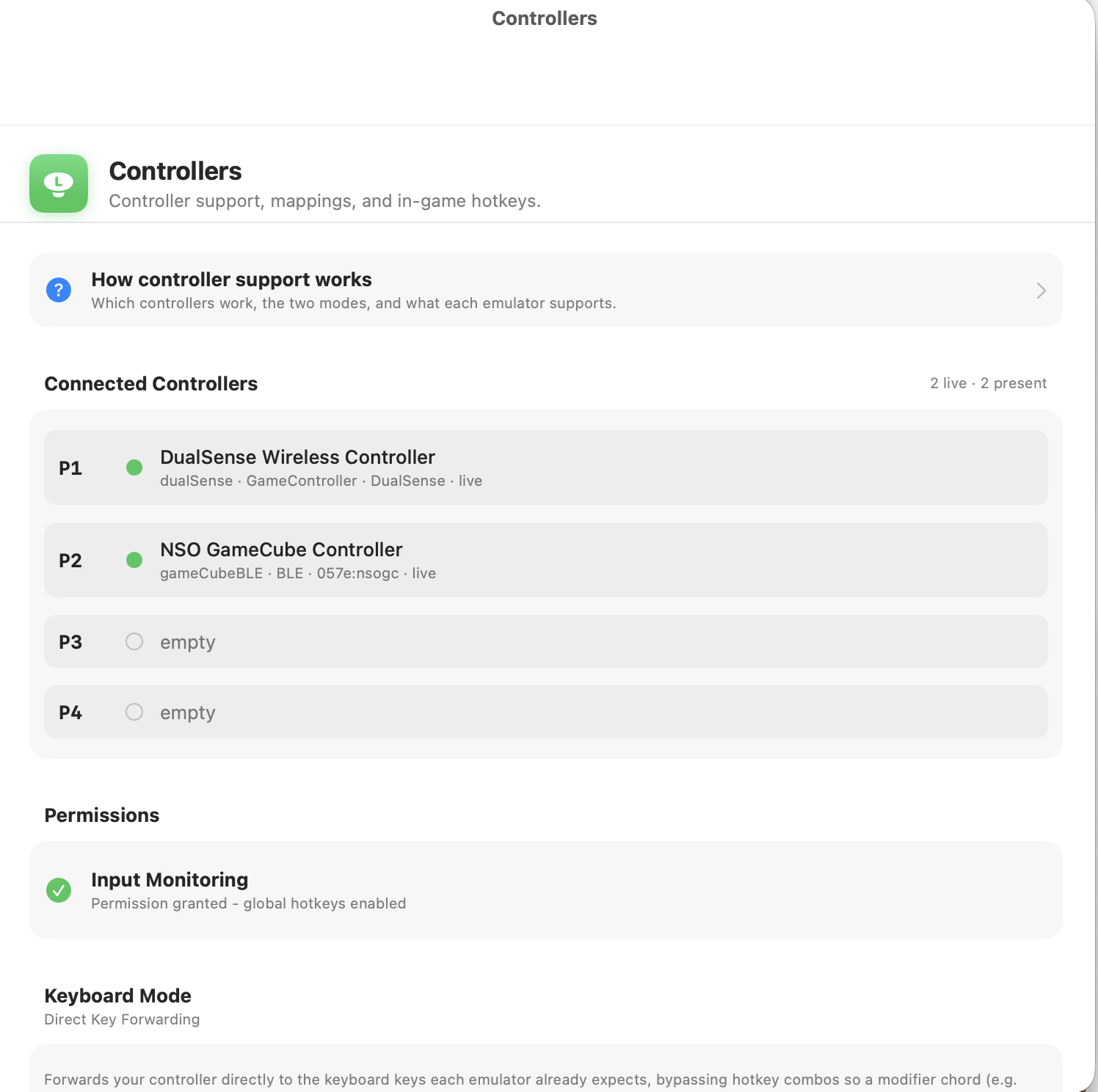
Open Settings → Controllers — always available in every build — to watch the registry live: each player slot, the controller in it, and whether it's live or present-but-idle. Power a pad on or off and the slots re-shuffle in front of you — the fastest way to confirm what The Vault thinks is connected. (Developer builds also expose the same view as a standalone floating window via ⌘ ⌥ ⇧ C.)
3. Presence is not liveness
Enumeration lies, so the registry tracks whether a controller is actually live, not merely whether the OS lists it:
- The Mayflash "Dolphin Bar" streams idle reports at ~4 Hz with no remote synced at all and exposes four USB ports whether or not anything is paired. A live Wii Remote streams at ~100 Hz. We tell them apart by report rate (≥6 reports in the last 300 ms ⇒ live), never by "a device exists."
- NSO N64 / SNES / NES / Genesis pads report as non-extended on recent macOS and aren't cleanly visible through GameController, so The Vault reads them over HID.
- Because of quirks like these, liveness is always stream/rate based, and identity is always (transport, VID, PID).
4. How each controller is handled, per emulator
This is the map from "which controller in which emulator" to "which input model, and can we hot-swap it live." Live hot-swap means you can turn Player 1's pad off mid-game and have another take over without relaunching.
| Emulator / platform | Controller | Input model | Live hot-swap |
|---|---|---|---|
| Dolphin — GameCube | NSO GameCube / Switch 2 Pro | BLE→DSU | ✅ Yes |
| Dolphin — GameCube | DualSense / standard pad | Native (SDL) | ⚠️ Relaunch |
| Dolphin — Wii | Real Wii Remote (Dolphin Bar) | Real-HID native | Emulator scans continuously |
| Dolphin — Wii | DualSense (emulated Wii Remote) | Native (SDL) | ⚠️ Relaunch |
| Cemu — Wii U | Wii U GamePad pairing | BLE→DSU | ✅ Yes |
| Astris — Switch | Any pad | Keyboard-forward | ✅ Yes |
| RetroArch | NSO N64/SNES/NES/Genesis, hand-mapped pads | Native (RetroArch mfi/hid) | Emulator's hotplug |
| RetroArch | Generic-pad macros / turbo | Keyboard-forward | ✅ Yes |
| PS2 (ARMSX2) | DualSense (hotkey / macro forwarding) | Keyboard-forward | ✅ Yes |
| PS2 (ARMSX2) | Other pads | Native (SDL) | Emulator's SDL hotplug |
| RPCS3, PPSSPP, Azahar, melonDS, ShadPS4 | Any pad | Native (SDL / GameController) | Emulator's hotplug |
| Flycast — Dreamcast | Any pad | Native (SDL, via RetroArch) | Emulator's SDL hotplug |
"Relaunch" means the emulator binds to a specific device at launch and doesn't reload its controller config while running — so switching to a different controller needs the game to be relaunched. See the handoff section for why.
5. Live controller handoff during a game
When you turn controllers on and off while a game is running, what happens depends entirely on the input model:
Where The Vault owns input (keyboard-forward & BLE→DSU)
These retarget live, so all three everyday cases just work:
- Player 1 turns off → the surviving pad shifts down into the Player 1 slot and keeps playing. (For BLE→DSU this is a live re-slot of the virtual DSU ports; for keyboard-forward the forwarder simply reads whatever pad is live.)
- No controllers → turn one on → it becomes Player 1.
- All off but one → that one is Player 1.
Slots follow connection order, so if the original Player 1 pad comes back later it rejoins as the next free slot (i.e. Player 2) rather than bumping the pad that took over.
Where the emulator owns input (native SDL / real-HID)
Native emulators (RetroArch, RPCS3, and Dolphin/PS2 with a DualSense or standard pad) link SDL and read the pad themselves. They bind to a specific device at launch and load their controller config once — there's no external "reload controllers" signal. So if you power that pad off and turn on a different one, the emulator is still polling the pad named in its config and won't pick up the replacement. The only way to change it is to relaunch the game with fresh config.
The exception is real-HID (a real Wii Remote via the Dolphin Bar): Dolphin scans for it continuously, so powering the remote on connects it without a relaunch.
6. What The Vault sets up at launch
Whatever the model, launch reads the registry snapshot and configures the emulator for the pads present right now:
- Native / real-HID → writes the per-controller button map and picks the right input driver (e.g. RetroArch's
mfifor most NSO pads,hidfor the Genesis pad), swapping A/B where Nintendo pads are labeled opposite the standard layout. - Keyboard-forward → starts the forwarder bound to the live slots.
- BLE→DSU → prewarms the DSU ports for the live pads and hands the bridge its slots.
- Everywhere → establishes the in-game hotkey scheme: hold the modifier and press R (Save), L (Load), Start (Quit), or ▲/▼ (slots). The modifier button differs per pad. See Hotkeys.
This page is the living reference for The Vault's controller architecture. Per-controller mapping and setup live in the pages listed under Controllers.